New Post

Showing posts with label Smartphone. Show all posts

How to Disable Auto Updates on Android Smartphone

Written By Nohara Binti Parahita Niya on Tuesday, September 30, 2014 | 9:44 AM

How to Disable Auto Updates on Android Smartphone - Often, the auto update ? Many or few applications that you use on Android smartphones , but you may want to choose which application you want to update rather than let auto update do its work . Of course, disable auto update on Android smartphones can be done easily , but for a beginner it may still not know how take it.

How to Disable Auto Updates on Android Smartphone

How to disable auto update on Android smartphones can be done via Google Play Store application . The following are the steps you need to do if you want to disable the auto update on Android smartphones :
  1. Open Play Store application .
  2. Open the menu on the top left corner . You can also access the Play Store menu by sliding from the left side of the screen to the right .
  3. Open the Settings tab , then select Auto - update apps .
  4. After you press the Auto - update apps , and will display a pop - up windows .
  5. Select " Do not auto - update apps " .

Easy , is not it? If you want to update the application , then you can go back to the previous settings . These tips KitKat tested on Android 4.4.4 , but the Android version ever before also has a similar way to disable auto - update apps .
9:44 AM | Read More

How to Charge Battery Smartphone or Tablet Quickly and Effectively

Written By Nohara Binti Parahita Niya on Sunday, May 25, 2014 | 2:30 AM

How to Charge Battery Smartphone or Tablet Quickly and Effectively  - You may have experienced a less pleasant events related to the smartphone battery life, for example, at that time you had a shower then wear neat and ready to go out with friends or family. But you just realized that the battery life of your smartphone running out after you pick it up.

How to Charge Battery Smartphone or Tablet Quickly and Effectively
If you've experienced it, you are certainly not the only person who has experienced the unpleasant incident. Well, if one day you're in a situation like that again, then there are several ways that you can use to charge your smartphone or tablet battery quickly and effectively.

1. Switching to Airplane mode or Turn off the smartphone
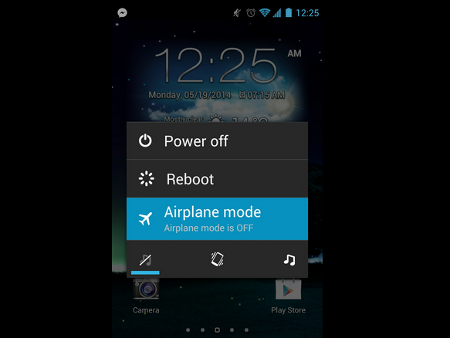
One way that this may not be a new way. What is clear, in stand-by condition smartphones or tablets still consumes battery power even a little. But by switching to Airplane mode, battery power consumption will be reduced so that more can be faster charging. But charging will be faster if you turn off the smartphone or tablet.

2. Do not charge through the USB port of computer
Smartphone or tablet is equipped with a charger. The charger can charge the battery faster than the USB port on the computer. That is because the USB port has an output (0.5 to 0.9 Amperes) with much less power than using the original charger (2 Ampere).

3. Use the USB port on a Mac (for iPhone and iPad)
If there is no power outlet (electrical socket), then you can use the USB port on a Mac computer to charge your iPhone or iPad. Latest Mac computers can instantly recognize the iDevice is connected and will increase up to 1.1 Amperes putput.

4. Use software to Improves USB output port
Again, most of the computer's USB port has an output of 0.5 to 0.9 Amperes, but there are some exceptions. For example, ASUS has named Ai Charger application that is designed to increase output on a compatible motherboard. Gygabite also has a similar tool called On / Off Charge.

5. Use ChargerDr
ChargerDr a USB charge booster that can increase the power output of the USB port. ChargerDr only priced at $ 20.

6. How to Charge Battery Smartphone or Tablet Quickly and Effectively
The final way that you can do to speed up battery charging using a smartphone or tablet is a micro USB cable forked. The USB cable can charge your smartphone or tablet two times faster than alkaline.
2:30 AM | Read More

Choosing the Right Android Smartphone, this trick

Written By Nohara Binti Parahita Niya on Friday, May 16, 2014 | 1:30 AM

Android mobile platform has become the choice of most manufacturers of smartphones in the world . Different from the iPhone which pegged the prices , models , and limited specs , the Android smartphones it offers many options for consumers . It was welcomed by consumers because they can choose Android smartphone with specs and pricing as needed according to ability .
Choosing the Right Android Smartphone, this trick
With a large selection of Android smartphones on the market , meaning that it would be difficult to choose a single Android smartphone that suits you rather than choose an iPhone . Therefore , if you are planning to buy a smartphone in the near future , you can use the following considerations :

1 . How much money do you have ?
Most expensive Android smartphones cost the same as the iPhone but of course there are many Android smartphones were sold cheaper . High-end smartphones such as the Galaxy S5 and HTC ( M8 ) could be an option for your deep pockets and need speed and full features to support your work . If you do not want to try a new smartphone , you can try out the Galaxy S4 or HTC releases of 2013. If you just want to experiment , guaranteed locally made Android smartphone will not drain your wallet .

2 . What software do you need?
Business software is the most important thing that you should consider before buying a phone . Software will determine how you will interact with your phone , what you can do and what it can ease you can .

In dasaranya same properties in all Android smartphones . What distinguishes it , the producers add custom skins so that each interface on the smartphone look different , as well as additional features .

If you want an Android smartphone with a simple software , you can choose a smartphone that runs stock Android . That is, you can choose the Nexus 5 , Moto X or Google Play version of the popular Android phone , or select only local products . Moto X not running stock Android , but Motorola did not do a lot of customization in it .

If you want an Android phone that is equipped with many additional features , such as the ability to open the application in a different window , the Galaxy S5 is your choice . Besides the Galaxy S5 also features a power - saving mode so that you can save battery under certain conditions .

3 . How big is the screen size you want ?

Currently the average size is 5 -inch Android phone . This size is large enough and comfortable to watch videos , view photos , read emails also ebook . If not big enough , you can choose the Galaxy Note 3 ( 5.7 inches ) complete with the S - Pen stylus . If you do not want size too big , you can buy an Android smartphone release last year .

With three considerations above , you can now specify which Android phone is best for you . Once again , please think about the budget you have , the software you need as well as a large screen size you want :)
1:30 AM | Read More

Tips: Recharge Your Smartphone 50 Percent Faster

Written By Nohara Binti Parahita Niya on Monday, November 25, 2013 | 12:00 AM

In your experience , there is one day when you must immediately leave a place for specific needs , and for a day you forget your phone charge not chasing deadlines for preparing for the departure .

Tips: Recharge Your Smartphone 50 Percent Faster
Tips: Recharge Your Smartphone 50 Percent Faster New
Waste of time you have just enough to shower and eat enough for a while, and you can only merecharge phone + power bank for a period of time is very little . For these critical moments , use this way to expedite the process on your mobile recharge .

First of all , know that you own a smartphone or tablet is a wide range of sensors and also to present a special modem WiFi connectivity , mobile , 3G , LTE , GPS , NFC and more. To make your phone capable of capturing these signals , your phone's battery should continue to provide energy supply is a constant so that each component remains active and keeps you connected. You already know where her right?

With this , then if you turn off the whole sensor and modem in the smartphone, then the battery energy consumption can be suppressed as much as possible , and will be able to accelerate the process refill your phone's battery. In theory, this means being able to save time on recharge to 50 percent rather than merechargenya as usual .

In short, if you are hasty and only have a few minutes to perform recharge before heading off somewhere, then do recharge in airplane mode position .

No matter what your phone is Android, iPhone, BlackBerry or Windows Phone, so you do recharge in airplane mode position , then when you need to recharge until penh be able abbreviated half. Have fun!
12:00 AM | Read More

How to Prevent It ?, (Smartphone and Laptop Battery Explosion)

Written By Nohara Binti Parahita Niya on Friday, November 22, 2013 | 2:41 PM

Lithium - ion or Li - ion called rechargeable batteries have become the most popular at the moment . Therefore has many advantages such as light weight material , has good energy density and not too expensive, the Lithium - ion batteries are widely used to support smartphones , tablets , laptops and many other electronic devices . But behind the superiority Lithium - ion batteries can also be flammable , even explosive.
How to Prevent It ?, (Smartphone and Laptop Battery Explosion)

How to Prevent It ?, (Smartphone and Laptop Battery Explosion) - New
Lithium - ion batteries that catch fire or explode tends to be the result of a process known as thermal runaway ( thermal runaway ) . Thermal runaway is basically the excessive positive feedback resulting energy into high temperature . This causes the system to be more heat , even to burn or explode . The cause of thermal runaway itself there are various kinds , such as short-circuit and the ambient temperature exceeds 60 degrees .

Some examples of battery cases smartphone or tablet ever exploded among other things, the Samsung Galaxy S3 and S4 Galaxy in July . There also exists the iPhone also erupt in China so that a woman injured in the eye . And most recently the case of Retina iPad in Australia , which is still under investigation cause. Although it sounds terrible but not to fear the smartphone , tablet or laptop into a time bomb . Then, what solutions or preventive measures that can be done ?

The first solution that you can do is to do a little routine maintenance Lithium - ion battery . Lithium - ion battery is known are tough but do not last long , Lithium - ion batteries generally have about 36 months of age . Through the period of the cell in the Lithium - ion batteries will be outdated and too loud . So you have to buy a new battery if Lithium - ion batteries are 36 months old . Lastly, Lithium - ion batteries must be recharged though energy capacity in it is still 50 % because Lithium - ion batteries can be easily damaged if the voltage is too low .
2:41 PM | Read More