Tips: Quick Ways to Register WeChat - chat application popular in word namely WeChat have you used it? WeChat you can use in almost all platforms such as Android, iPhone, BlackBerry, Windows Phone and Symbian. Chat application developed by Tencent supports many languages like English, Mandarin, Indonesian, Spanish, Portuguese, and many more which makes WeChat could almost be used by all users around the world. WeChat also supports the use of using Wi-Fi, 3G, and 4G to allow users to use WeChat.

Here's a quick way to list WeChat:
1. Download the app WeChat advance for your smartphone
2. You can choose to sign up using the phone number or use Facebook Connect facility
3. If you use a phone number, select Sign Up and you need to write down your phone number without using the number 0 is at the front, while a check Read and Agreed, then Next
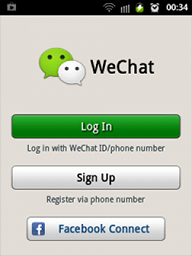
4. Once the process is complete, the page will appear consent if you want to synchronize with the phone book on your smartphone, then Ok
5. Write username that you want, and select Done, if there is an agreement to select Ignore Facebook Connect. Then after getting to the last page select Enter, and you're done.
Congratulations, you've registered to use WeChat, and WeChat already you can use. First of all, find your friends who use WeChat, or use features such WeChat Look Around Drift Bottle or to look for other people who use WeChat around you. Good luck.
Here's a quick way to list WeChat:
1. Download the app WeChat advance for your smartphone
2. You can choose to sign up using the phone number or use Facebook Connect facility
3. If you use a phone number, select Sign Up and you need to write down your phone number without using the number 0 is at the front, while a check Read and Agreed, then Next
4. Once the process is complete, the page will appear consent if you want to synchronize with the phone book on your smartphone, then Ok
5. Write username that you want, and select Done, if there is an agreement to select Ignore Facebook Connect. Then after getting to the last page select Enter, and you're done.
Congratulations, you've registered to use WeChat, and WeChat already you can use. First of all, find your friends who use WeChat, or use features such WeChat Look Around Drift Bottle or to look for other people who use WeChat around you. Good luck.
6:16 PM | Read More


